Subscribe For Free Updates!

We'll not spam mate! We promise.

Showing posts with label Tips and Tricks. Show all posts

Monday, October 14, 2013

How to hide the hard disk drive/partition of your computer through CMD

Today i'm gonna share a tricks that may hide your drives.

Hiding your files folder by folder takes a lot of time, so in case of that can i hide the entire drive to reduce my work? . But why you should hide your files? hmm, it is maybe  because you want to protect all files from the intruders and probably because you have something personal files like video or pictures that you want to make it private.

It is possible to hide the entire drives and how? Yeah it is possible through the command prompt of your PC or Laptop.

To achieve of hiding your drives, kindly follow the steps below :

1. Click the start button at the left bottom pane of your desktop
2. Now run cmd or command prompt and hit enter
3. Now type DISKPART manually.
4. And then list volume
5. Decide what partition or drive will you hide
6. Example is the volume 2 or the partition E in my laptop, and then type select volume 2 or E
7. Type remove letter E, and your done your partition is being removed from your desktop,
8. To bring back your partition type this code : assign letter E, look at the screenshot below.

All the command will look something like this :

Note:
The partition is only being hide, it will note wipe out all the data included in the selected drive.

Do i make myself clear?

Confused?

Leave your comment below

Feedback from the readers are appreciated

#chrofox

Wednesday, October 9, 2013

Permanent solution in recovering the hidden files of USB/Flash Drive and Memory Card

Having a malware in your flash drive just like a simple shortcut in your files and hide the original is necessary to delete before it's spread to other computers. I am also a victim of this malware once in our computer laboratory, so to keep your USB for further damage just follow the steps below.

Now I'm gonna show you how to recover the hidden files on your flash drive.

Requirements:

1. Virus free Computer or Laptop and
2. Flash drive or USB.

Follow these steps :

1. Plug in your flash drive into your PC or Laptop
2. Click the start button in the 
3. Now find the corresponding partition value of your flash drive


Permanent solution in recovering the hidden files of USB/Flash Drive and Memory Card

As you can see the value of my flash drive is letter G

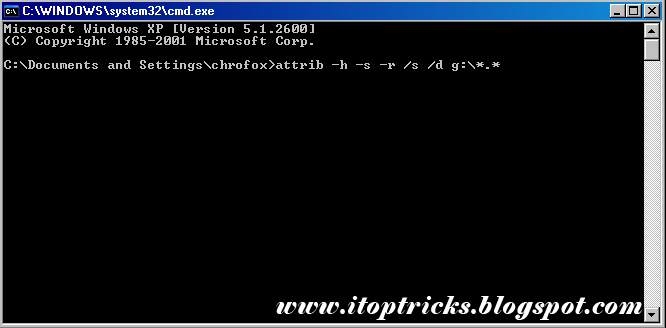
4. Now open the cmd or the command prompt and manually type attrib -h -s -r /s /d g:\*.* 

Permanent solution in recovering the hidden files of USB/Flash Drive and Memory Card
Note:
The letter G represents the partition value of your flash drive. It is case to case basis so it is not necessary to use this code if your partition is letter F or E.

The following command is used to retrieve the files from being hidden due to viruses.

5. Click right click inside your flash drive and select refresh.

And your done, I hope this tweaks helps you :)

Confused?

Leave your comment below

Feedback from the readers are appreciated

#chrofox
Wednesday, September 25, 2013

How to resize all the element's width of blog template

Some bloggers didn't satisfied with their template coming from any other site that offer it for free, and they want to customize it to be more presentable, if you have a problem with your template's width you are in the right place to read.

In this tutorial you will learn how to resize the header, sidebar, post section and footer of your blog template. Follow these steps to edit the width of your blog.

Let's start

  • Log in to your blogger account
  • Find TEMPLATE
  • Click on EDIT HTML
Now find the following code below in your html 5 editor.
Resize the header, sidebar, post section and footer of your blog template
#header-wrapper{#}
;width: 1100px;

#outer-wrapper
{width:1100px;

#footer
width: 1060px;

#main-wrapper
{width:670px;

#rsidebar-wrapper
{width:360px


As you can see there is a highlighted text which is the word width and px(pixels). You can edit the value of pixels at your will and depend how wide you want.

#header-wrapper - for main header
#outer-wrapper - for the main section
#footer - for footer
#main-wrapper - for post section
#rsidebar-wrapper - for sidebar

Note:

Those things are complicated, if you want to change the value of the post section make sure you will change also the value of your outer-wrapper, but changing outer-wrapper it requires to change also the value of the main-wrapper, side-wrapper and margin.

Confused?

Leave your comment below.

Feedback from the readers is appreciated.

#chrofox

Saturday, September 7, 2013

How do blogs affect or help the people today?

How do blog affect or help the people today?
Good day to all my readers, now i will discuss what is blog all about.

We are aware that most of the information we gather is from the internet or let me say the on web. Web is undoubtedly the widest shell of information, it helps us to stay updated about the trends and other things that impact the generation of today. But the frequently asked questions by some readers who want also to share their experience or knowledge is, How did they do it? How to create a website or a blog? How can i share my knowledge too? Hmm, for me it is easy as 1,2,3...,why? let me explain

The first thing you'll have to know to start a blog is:

What is Blog?

       Blog is came from it's root word WeBlogs which means saving or putting text online. It is launched by Pyra Labs on 23rd of August 1999 and currently being hosted by Google. It is provide information all about technology, food, travel and etc. that may affect in our living.

What is Blogging?

       Blogging is simply sharing knowledge or experience all about everything, in my case i am a tech blogger that share knowledge all about technology. Blogging is not all about technology, you can also be a food blogger by also sharing your knowledge in food and also to be a travel blogger by sharing your experience in exploring the world. But be careful

What are the benefits of being a blogger?

      Bloggers can also have benefits too, like when your blog gets a perceivable  amount of views, people may post their products or other content that they own in exchange for money. This is something we call advertising. Advertising can make enough money to sustain  your living for a month, depending the deal that advertising company made with you.

Is this true? i can make money by blogging? Yeah it is really true, it can be possible by applying to an advertising company.

What are the advertising company will you apply for?

      Theres a lot of advertisng company that offer a free registration for monetizing your blog like the following list below:

1.Google Adsense
       - it is the default advertising program in blogger.com, before applying kindly use this tips for the approval. Tips for Adsense Approval
2.Media.net
       - it is a contextual advertising program that can be the best adsense alternatives, what is media.net?hmm try this.
3.Infolinks
      - it is also a advertising program that has a PPC or pay per click system, but as the times goes by they have a new, it is the Ad-views or paying the publisher by viewing the ads whether it is click or not.
4.Disqus
      - it is a online comment platform which pay you by clicking the ads below your blog post, it also change your comment form by another one which is hosted by disqus.

That all for today, thanks for reading my article :) ...

Confused?

Leave your comment below.

Feedback from the readers is appreciated.

#chrofox

Tuesday, September 3, 2013

Turn Windows Xp and 7 into Mac OS X Lion 13

Is there a possibilities that windows operating system turn into a Mac operating system?
Well the answer is yes, it is possible by using Lion Skin Pack.

We all know that Mac is such a great OS for all the computer expert because of its cool features like the dock, cursor and etc.., but by using Lion Skin Pack means that your computer will be fast like a Apple, that is definitely wrong because it also depends on your hardware on how fast it can manage.

Lion Skin Pack is a wonderful software that will allow you to experience the world of Apple. It is a customization for windows xp and 7.It supports x32 and x64-Bit of windows xp and 7. So it is able for you to install without having any hesitation.

It will definitely change all of windows features such as theme, wallpaper, login screen, start button, icons, boot screen and many more for the end-users to experience the real Mac functions.

I am not the owner of this software so I will give all the credentials to the designer which is Hamed and I want to thank him for make all this things possible.

Note:

I strictly recommend to the end-users to have a system restore in the computer to use before the installation to revert all the changes if the end-user did not satisfy the results of the transformation of the windows.

Get Lion Skin Pack Below.

Download for Windows XP
Download for Windows 7 x32
Download for Windows 7 x64

Don't worry all the link is safe, virus and survey free.

Confused?

Leave your comment below.

Feedback from the readers is appreciated.
#chrofox

Tuesday, May 21, 2013

Useful tips to get approved by Google Adsense

approved
Nowadays Google Adsense is very strict of approving you as a publisher. Now before applying to google adsense you must follow this tips for faster approval.

Template

You must have a very clean and easy to navigate template.

Age is Qualified

As a blogger you have to be 18 years old and above to get the approval from Google Adsense. If your not qualified and your age now is 17 the Google Adsense didn't accept your application perhaps it waits a year to ensure that you are qualified to be ablogger.And aslo your age will be sync in your yahoo account.

Unique Article 

You must have a unique post or in other words you must have a originality in posting your topics. Do not copy any post from the other blog nor your website will be banned or blocked by google.And also your blog must contain 20-30 articles to get approved.

Traffic

And the most important is the traffic . You must have enough traffic coming from the other country mostly from the United State.

Kindly use this tips before applying to Google Adsense.

Confused?

Leave your comment below.

Feedback from the readers is appreciated.

#chrofox

Monday, April 29, 2013

HOW TO MAKE A BOOTABLE USB: WINDOWS Xp, Vista, 7, 8

Bootable USB
This is for those who want to reformat or repair their Windows or Operating system such as Windows xp ,Vista ,7 and 8.Specially for some netbook without CD/DVD rom drive.


Just follow the step to make your USB bootable.

The tools we are needed are the following

1. Winrar
2. WinToFlash
3. Installer of Windows
4. USB flash drvie (minimum of 1GB for Windows xp and 4GB minimun for Vista, 7 and 8.)

Follow the steps below :

1. Just download the file and extract it to one folder.
2. Double click the WintoFlash
3. Click the accept button
4. Click the file picture to enter the wizard mode
5. Click Next
6. Find the files path
7. On USB drive click select button
8. Select USB flash drive that you have use
9. Click Next Button
10 . Select " I Accepted the Terms of the Liscence Agreement " then continue
11. Please wait for the files to transfer in to your USB
12. If already done transfering files, Click Next Button then Exit

And your DONE!!!!

Now you have a bootable USB.

Confused?

Leave your comment below.

Feedback from the readers is appreciated.

#chrofox